
Working with Playbooks
The Playbooks page is SideButton's work-&-watch surface. A playbook is an ordered recipe of role + workflow steps that works one ticket end-to-end — Bug Fix, for example, chains QA triage → SE root cause → SE fix (PR) → SE review & merge → QA regression — with a verdict gate between steps deciding what happens next. It is the single-ticket counterpart to the Tasks pool: where the pool is many tickets you drop and leave to the scheduler, a playbook run is one ticket you start now, with hands-on options, and watch advance step by step.
Under the hood every step dispatches a normal agent workflow, so a run is a chain of jobs stitched together by gates — the machinery is explained in Orchestrating Agents. This page walks the surface built on top of it: the intake, the live zone, the run history, and the library behind Manage playbooks.
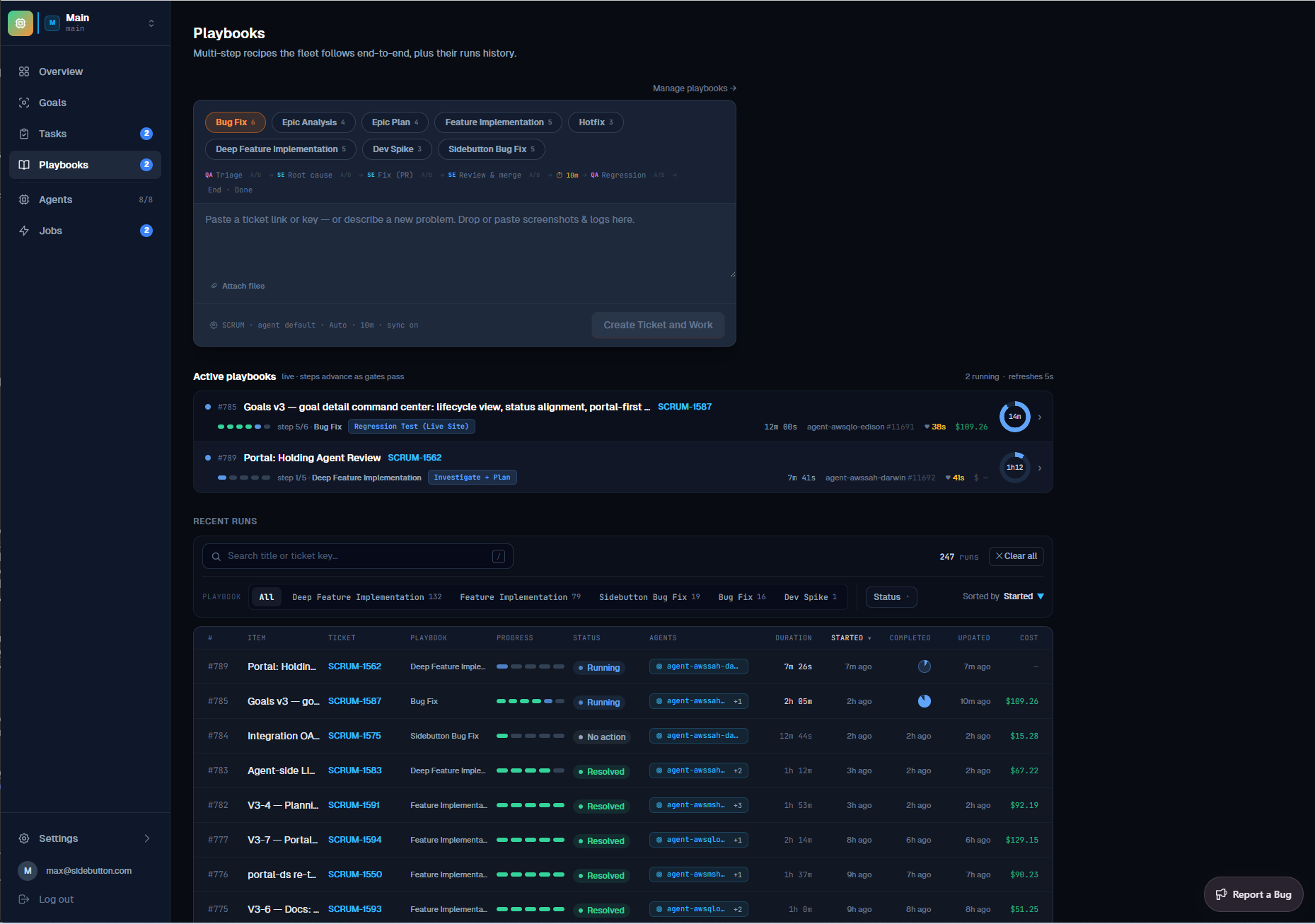
Start a run
The intake card at the top is the whole gesture. Pick a recipe from the pills — one per playbook, with its step count — and the line below previews exactly what will run: each role-tagged step, its gate, and any timed pause. Then give it work, one of two ways:
| Input | What happens |
|---|---|
| Paste a ticket link or key | The run works that existing ticket — reads it with comments and attachments, and reports each step back to it. |
| Describe a new problem | SideButton writes the ticket first (drop or paste screenshots & logs — they attach to it), then starts the run on it. One step, no tracker round-trip. |
The quiet options row at the bottom sets the target project, the agent, the effort tier, the per-step time estimate, and whether the run syncs the ticket's tracker status as it progresses. Create Ticket and Work commits the whole thing.
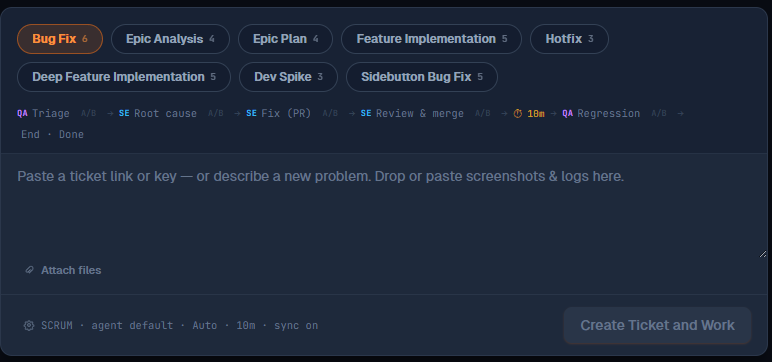
Watch it run
Every non-terminal run gets a lane in the Active playbooks zone, refreshed live: the step ribbon, the current step's workflow chip, the agent working it, elapsed time, running cost, and a time-left dial once the run has an estimate. Steps advance as gates pass — the lane is the run's heartbeat, and clicking it opens the full run page with the transcript and per-step jobs.
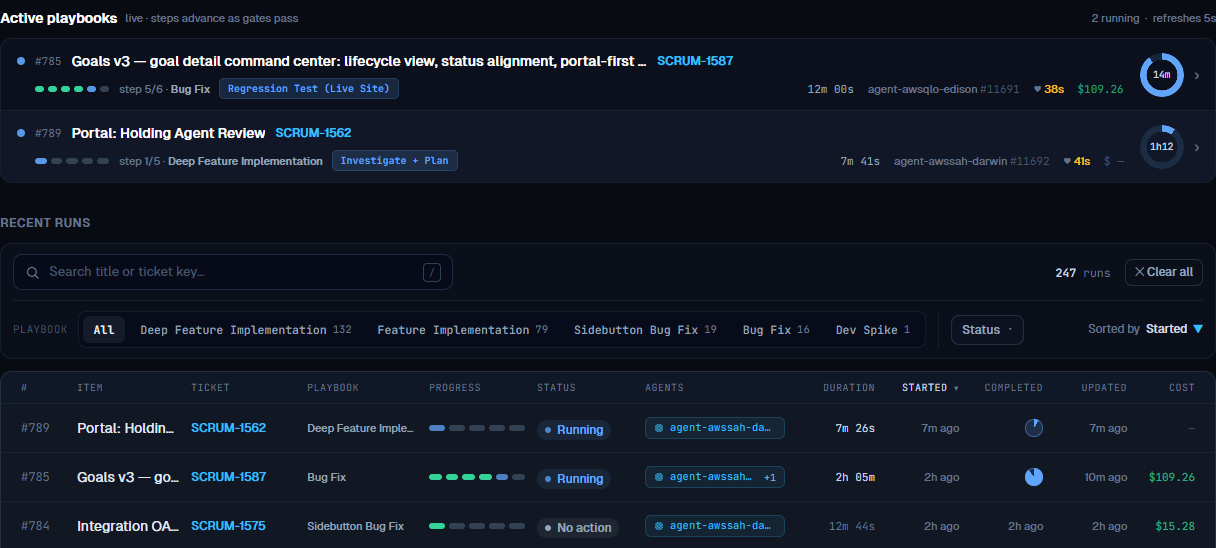
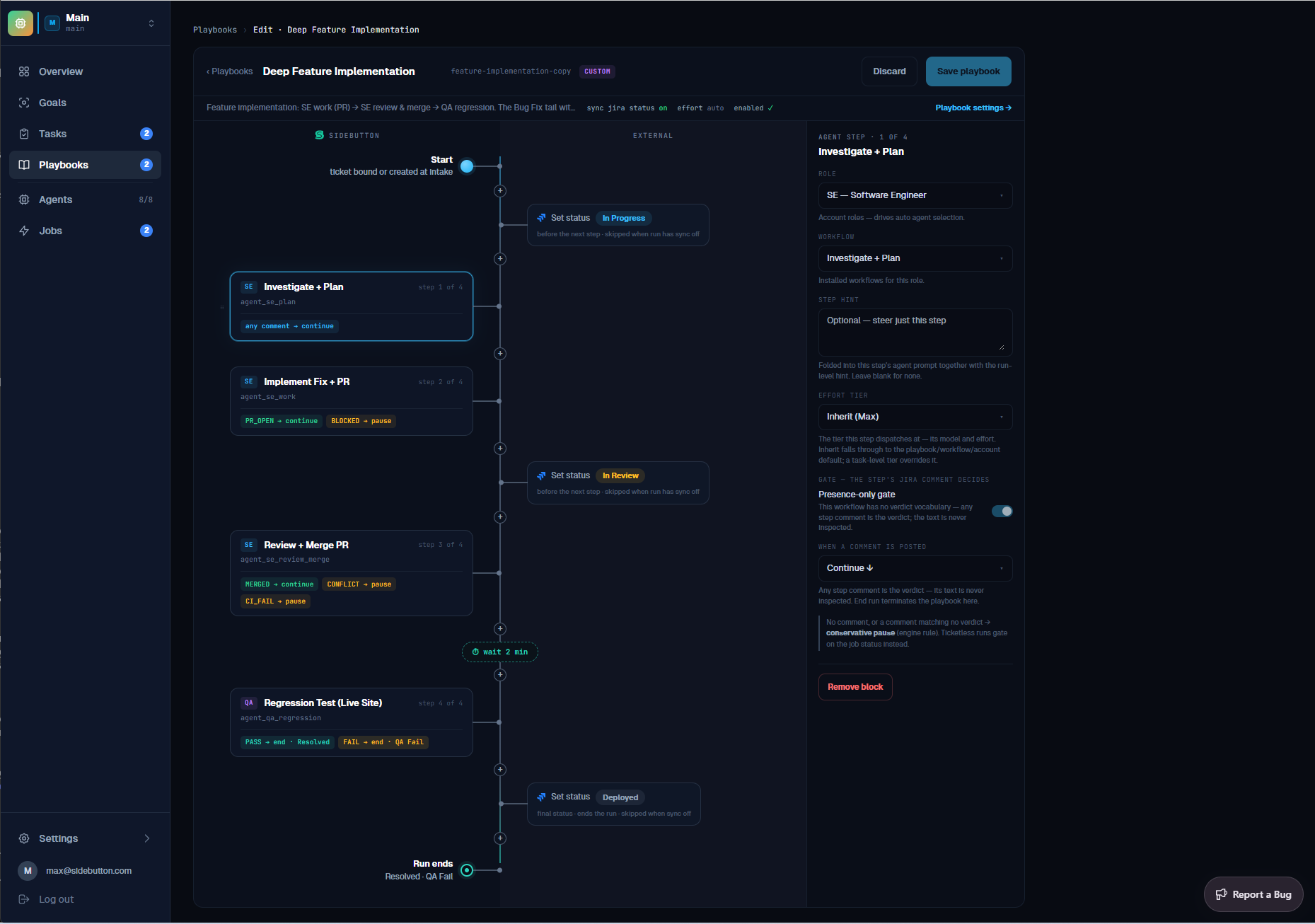
Gates are conservative by design: a step's verdict (PR_OPEN, PASS, FAIL, BLOCKED, …) decides whether the run continues, ends, or pauses for a human — and an unknown or missing verdict pauses rather than advancing silently, except on steps with a presence-only gate, where any comment counts and the run continues (read-only steps like triage and analysis use these). A paused run stays paused until you act on it; a timed pause (for example the 10-minute settle before regression) shows a countdown you can skip. The full gate contract lives in Orchestrating Agents.
Recent runs
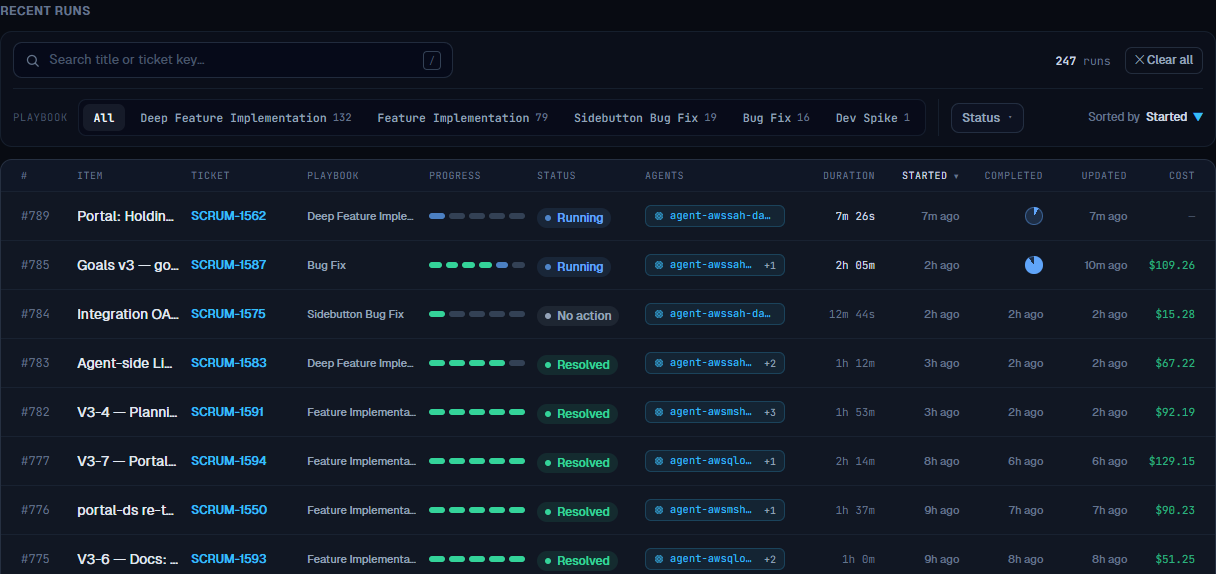
Everything you have ever run lives in Recent runs — searchable by title or ticket key, filterable by playbook and status, sortable by any column, with per-run duration and cost. The list loads more as you scroll, and every row links to its full run page. This is where a resolved ticket answers "what did that take?": the cost column is the run's real token spend.
The playbook library
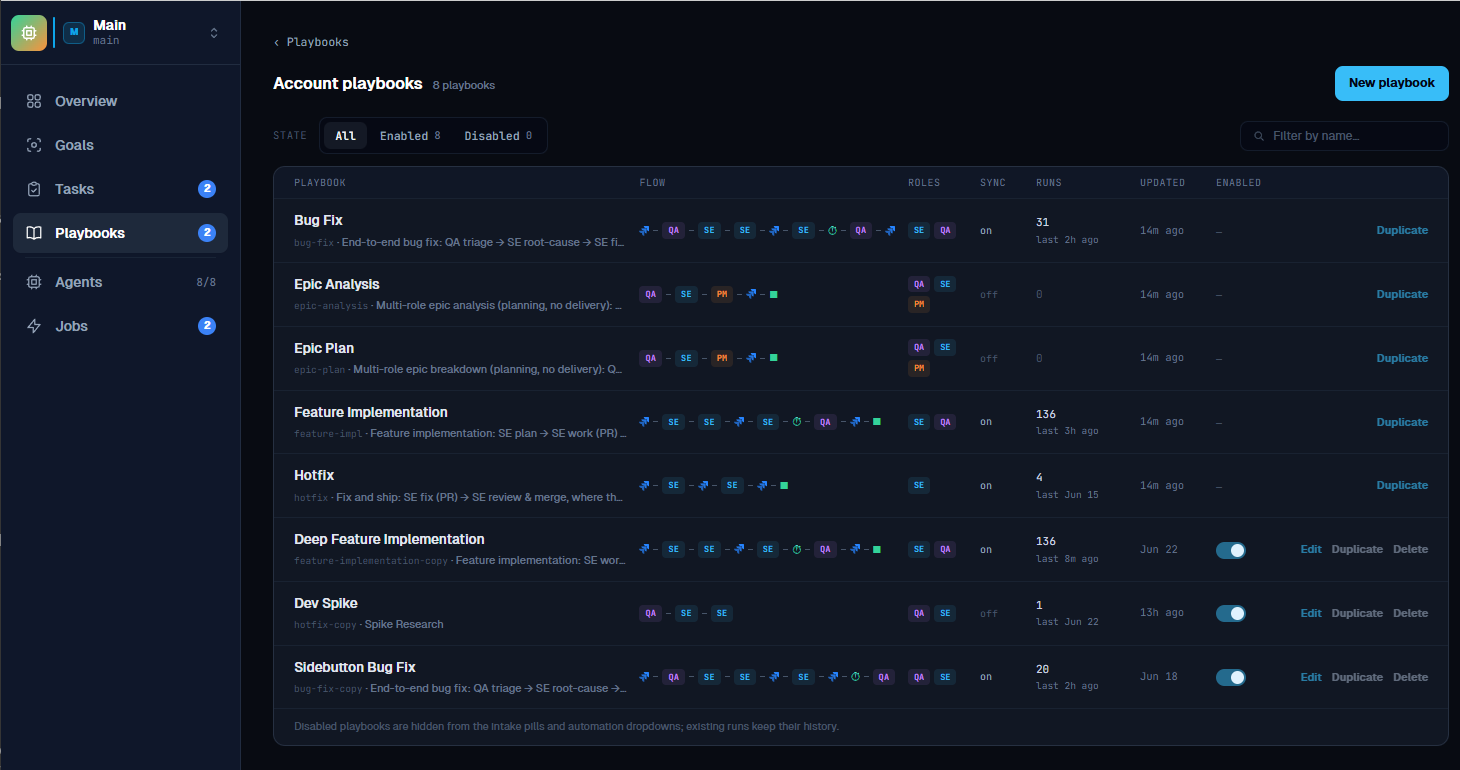
Manage playbooks, next to the intake, opens the playbook library — every recipe visible to the account: the seeded defaults (Bug Fix, Feature Implementation, Hotfix, planning-only recipes) plus your own custom ones, each with its step and run counts. Seeded playbooks are read-only: View opens the flow, and duplicating it gives you an editable copy. Your custom rows open in the editor with Edit.
Editing opens the two-lane flow canvas described in Orchestrating Agents — agent steps and their gate rules on one lane, the ticket-status updates the run performs on the other.
Issue type routing, next to the library entry point, maps your tracker's issue types to playbooks per account — it is how a bug suggests Bug Fix and a story suggests Feature Implementation everywhere a suggestion appears, including the Tasks pool.
Good to know
- Playbooks is work-&-watch; Tasks is drop-&-forget. Start one ticket here with hands-on options; batch many into the pool and let the scheduler order them. Playbooks intake never writes to the pool.
- No tracker? Runs still work. Without a connected tracker the intake runs ticketless — steps advance on job status instead of ticket verdicts, and there is nothing to sync. Connect Jira or Linear to create and drive real tickets.
- Sync status is visible progress. With sync on, the ticket moves through its tracker workflow states as the run advances — people watching the board see agent progress like a teammate's.
- Steps declare a role, not an agent. Whichever suitable agent is idle picks a step up, so one run can span several agents.
- A run can outlive a playbook edit. A run keeps the steps it started with; its ribbon reflects the steps it really ran, not the recipe's current shape.
Related Documentation
- Orchestrating Agents — workflows, gates and dispatch, the machinery under every step
- Working with Tasks — batch many tickets into the pool and run them in dependency order
- Linear Automations — start playbooks automatically from issue events
- Notion Boards — start playbooks automatically from a Notion kanban board
- Jira Integration — connect the tracker your tickets live in
- Cloud Agents: AWS · Hetzner · GCP