
Orchestrating Agents with Workflows
SideButton workflows come in two flavors. Browser workflows — the ones covered in the DSL Reference — are executed step-by-step by the SideButton engine on your machine. Agent workflows hand a complete mission to a cloud agent: the workflow opens a terminal on the agent VM and launches a Claude Code session with a mission prompt, and the agent does the rest — reads the ticket, writes the code, tests in a real browser, and reports back.
This page explains how the portal uses agent workflows to orchestrate a whole fleet: single jobs, multi-step playbooks, verdict gates, and the ticket thread as the coordination bus.
How a run works
- Work arrives — you paste a ticket into the portal, an automation matches an issue event, or your own AI assistant calls a SideButton MCP tool.
- A workflow is dispatched — the portal picks an idle agent with the right role, fills the workflow's inputs (ticket URL, hint, working directory), and resolves the effort tier to a concrete model.
- The agent works the ticket — a fresh Claude Code session runs the workflow's mission: read the ticket with all comments and attachments, do the work, verify it.
- The agent reports to the ticket — one structured comment with what was done, evidence, and a verdict (for example
PR_OPEN,PASS,FAIL). - The gate decides — in a playbook, the portal reads that comment and either advances to the next step, pauses for a human, or ends the run — syncing the ticket's status as it goes.
Everything an agent does lands on the ticket, so the issue thread doubles as the audit trail: every step, every verdict, every hand-off is a comment you can read after the fact.
The workflow catalog
Every account ships with a default catalog of agent workflows, grouped by role — Software Engineer, QA Engineer, Product Manager, Skill Discovery, Ops. The role decides which agents can pick the work up; the effort tier decides how much model to spend on it.
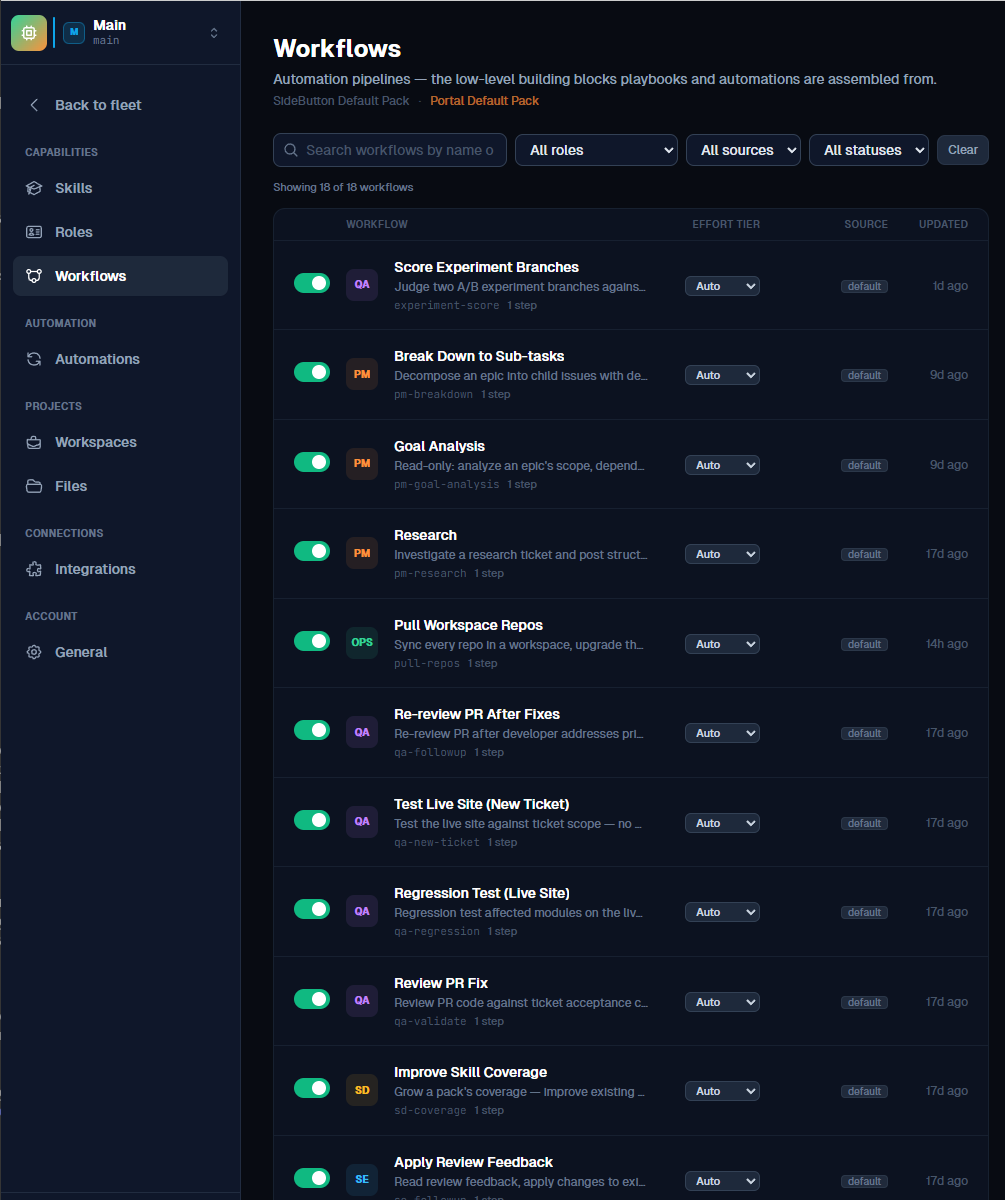
A few examples of what the catalog covers:
| Role | Workflow | Mission |
|---|---|---|
| SE | Investigate + Plan | Read-only: investigate the ticket and post a work plan |
| SE | Implement Fix + PR | Implement the change and open a pull request |
| SE | Review + Merge PR | Review, resolve conflicts, pass CI, merge |
| QA | Review PR Fix | Code-level review of the PR against acceptance criteria |
| QA | Regression Test (Live Site) | Post-merge regression pass on the touched modules |
| PM | Break Down to Sub-tasks | Decompose an epic into dependency-ordered child issues |
| PM | Research | Investigate a research ticket and post cited findings |
Anatomy of an agent workflow
Agent workflows are plain YAML files that live in knowledge packs. The whole definition is small — the intelligence is in the mission prompt, not in step logic:
id: agent_se_rca
title: "Root Cause Analysis"
description: "Investigate bug, trace root cause, report findings without fixing"
metadata:
  agent: true          # dispatched to a cloud agent (not engine-interpreted)
  role: se
params:
  ticket_url: { type: string }                        # the ticket to work
  hint:       { type: string, default: "" }           # optional extra instructions
  entry_path: { type: string, default: "~/workspace" } # working directory
steps:
  - type: terminal.open
    cwd: "{{entry_path}}"
  - type: terminal.run
    cmd: |
      # launches a Claude Code session with the mission prompt:
      #   read ticket with attachments and all comments - {{ticket_url}} ...
      #   trace through the code to identify root cause. {{hint}}
      #   write one comment to the ticket with: symptoms, root cause,
      #   suggested fix approach, and complexity estimate.
The inputs are filled in at dispatch time — the portal resolves the ticket URL, your optional hint, and the working directory for the agent's workspace. The portal also wraps every dispatch with monitoring on top of what the YAML defines: it polls the agent until the mission completes, then collects the transcript, token cost, and any pull requests into the job record.
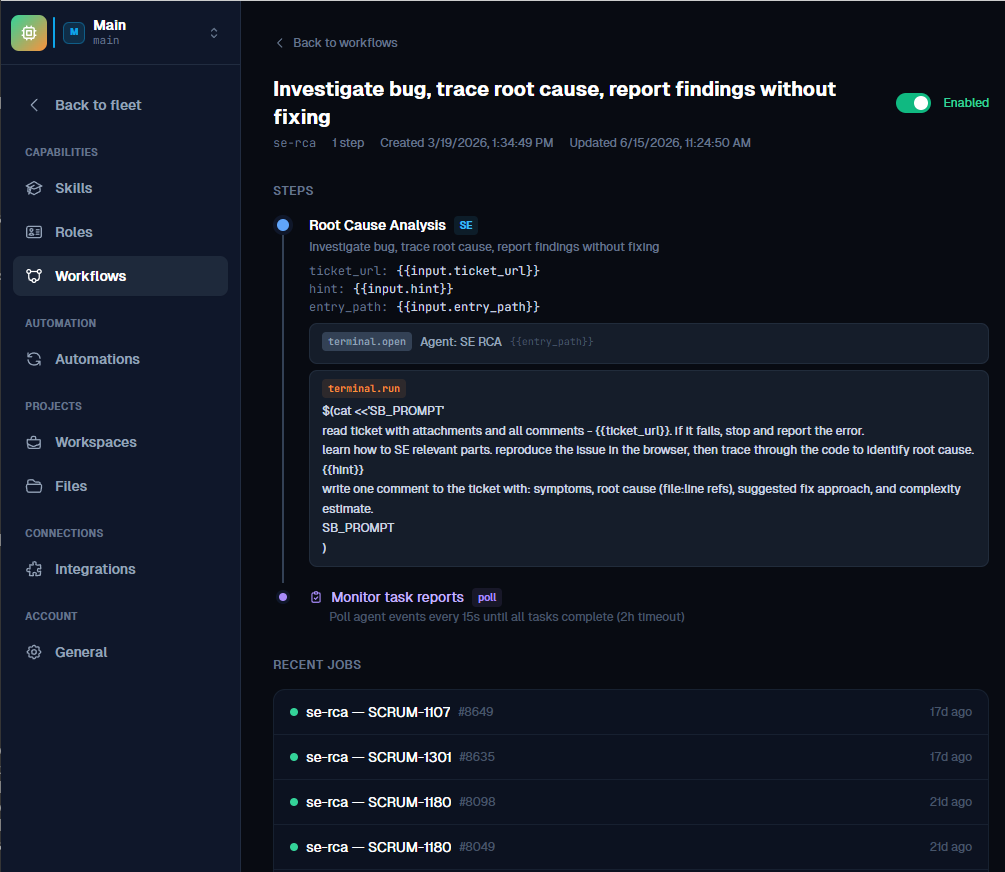
One workflow dispatched once = one job. Jobs are the atoms of the system: each has an agent, a transcript, a duration, and a cost.
Run a workflow on an agent
The simplest way to dispatch work is straight from the fleet: pick a workflow, point it at a ticket, choose the agent and effort tier, and run. The composed prompt panel shows exactly what the agent will be told — your inputs and hint substituted into the mission — before you commit.
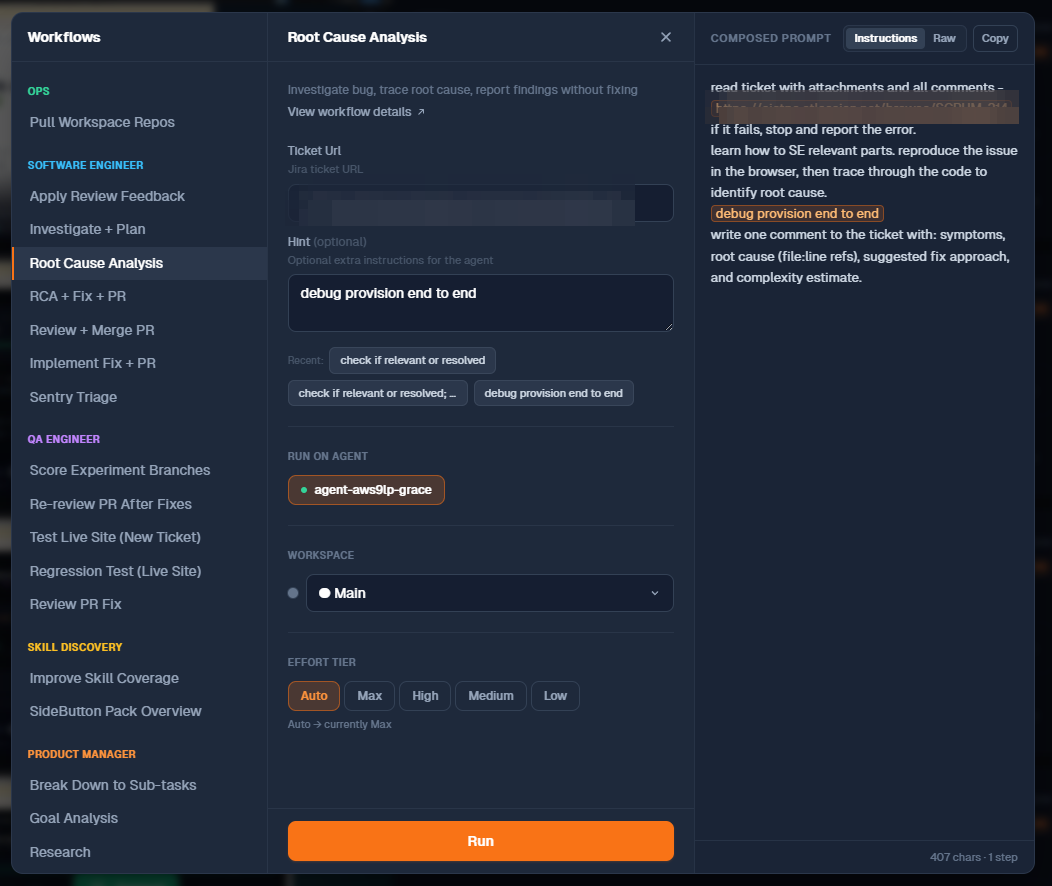
Dispatching by hand is one of several entry points:
| Entry point | What it does |
|---|---|
| Run on agent (portal) | One-off job on a specific agent, like above |
| Playbooks | Multi-step, gated runs — the recommended way to work tickets end-to-end |
| Automations | Jira/Linear issue events, job lifecycle events, or cron schedules that dispatch on their own |
| MCP tools | Your own Claude / IDE calls SideButton Cloud tools such as work_on_task or run_workflow |
Playbooks: chain workflows into missions
A playbook is an ordered recipe of role + workflow steps that works one ticket end-to-end — for example Bug Fix: QA triage → SE root cause → SE fix (PR) → SE review & merge → QA regression. Accounts start with seeded playbooks (Bug Fix, Feature Implementation, Hotfix, planning-only recipes) and you can duplicate and edit any of them.
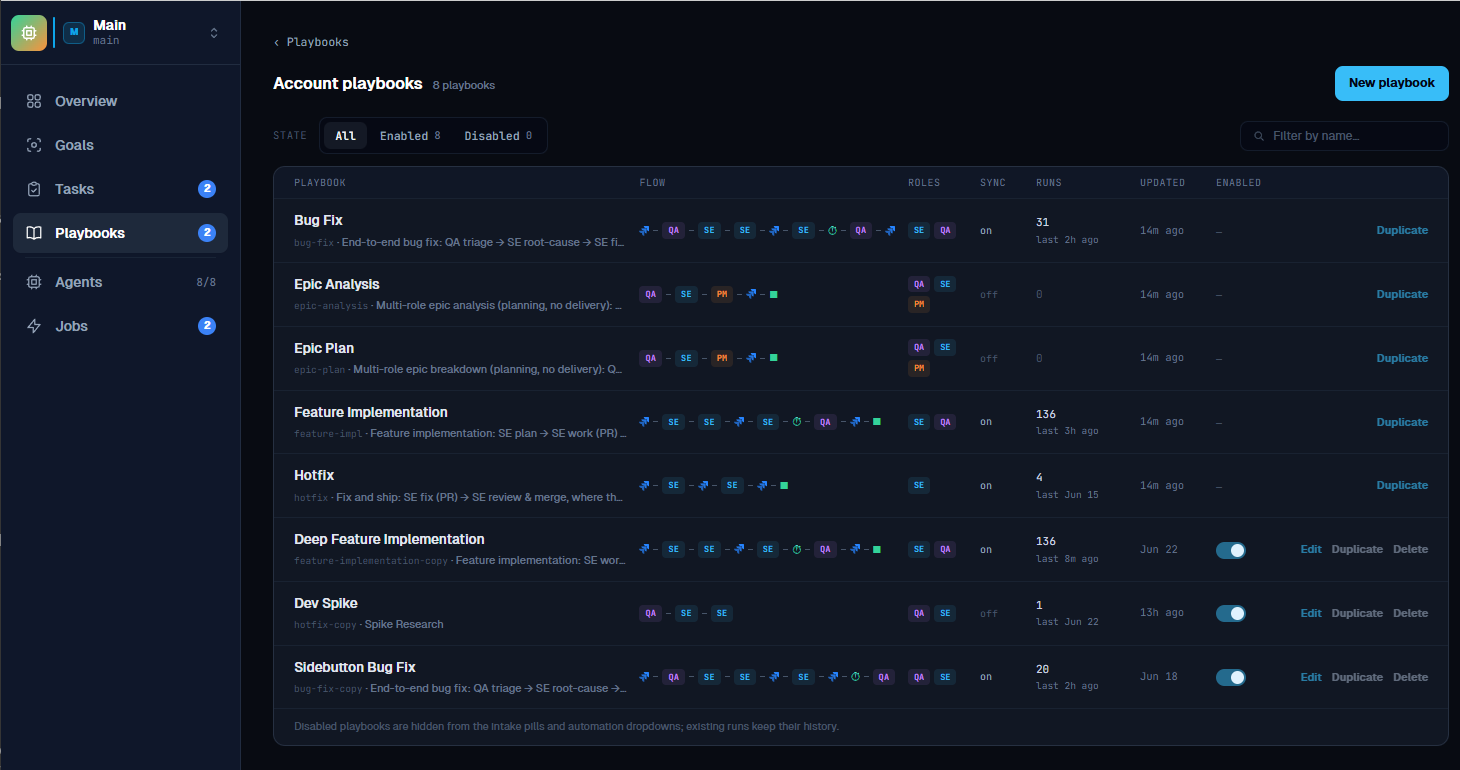
Each step of a running playbook dispatches a normal job — so a playbook run is a chain of jobs stitched together by gates, and possibly spread across several agents. Steps declare a role, not an agent: whichever suitable agent is idle picks the step up.
Gates: verdicts decide what happens next
Between steps, playbooks pause at gates. The gate reads the comment the agent just posted to the ticket and matches the verdict token against the step's rules:
| Verdict in the step's comment | Typical gate rule |
|---|---|
PR_OPEN | continue to the next step |
MERGED | continue |
BLOCKED, CONFLICT, CI_FAIL | pause for a human |
PASS | end the run as Resolved |
FAIL | end the run as QA Fail |
Two safety properties are built in. First, a gate never advances silently on an unknown or missing verdict — the conservative default is to pause and ask a human. Second, a paused run stays paused until an operator overrides the gate, re-runs the step, or cancels — so an agent can never talk its way past a checkpoint.
The playbook editor shows the whole contract on one canvas: agent steps with their gate rules in the SideButton lane, and the ticket status updates the run performs (In Progress → In Review → Deployed) in the external lane. Read-only steps can use a presence-only gate — any comment counts, and the run continues.
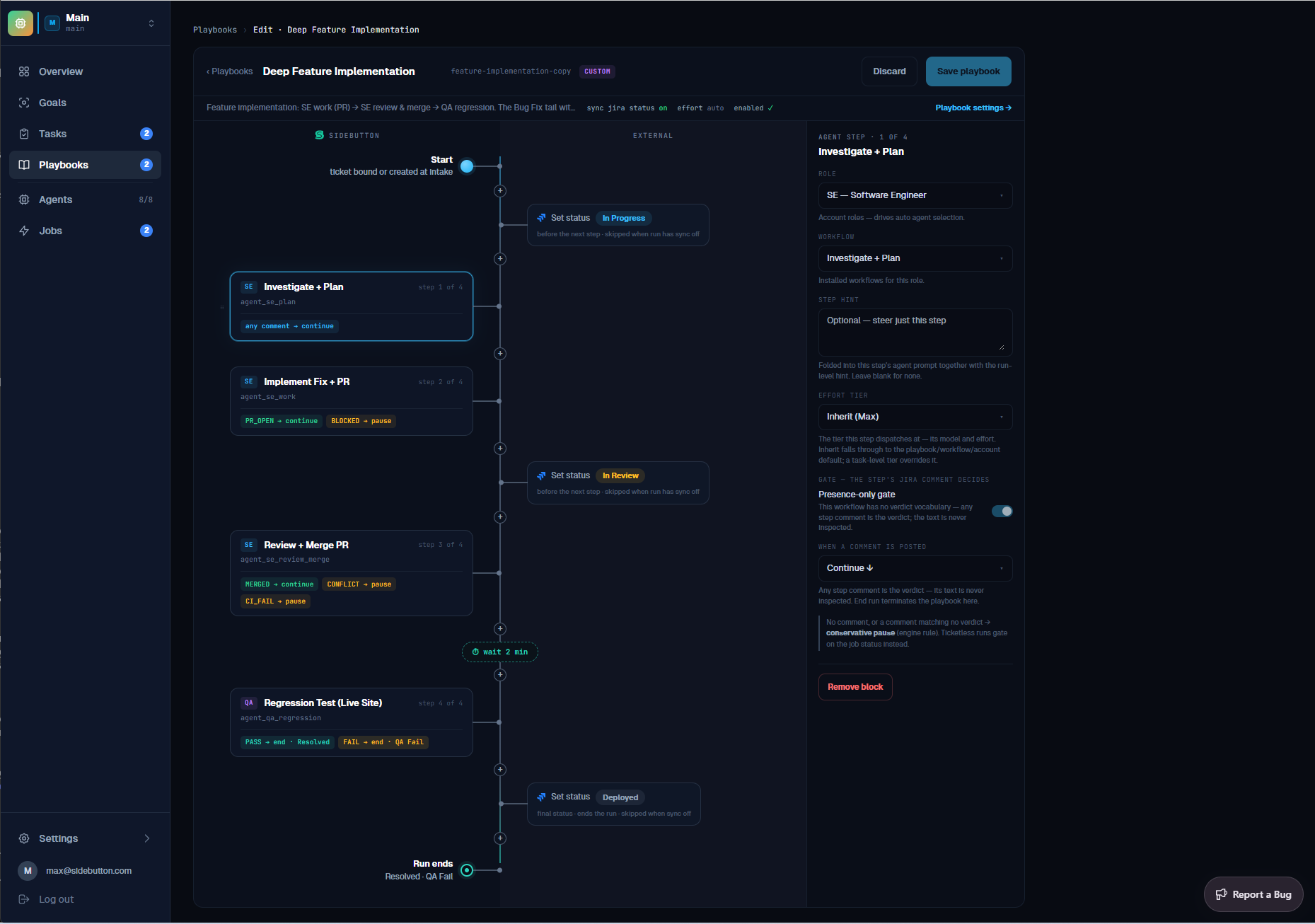
With sync status on, the ticket in Jira or Linear moves through its workflow states as the run progresses — people watching the board see agent progress the same way they'd see a teammate's.
Watch it run
The Playbooks page is the operating view — the full tour of it lives in Working with Playbooks. At the top, intake: paste a ticket link — or just describe a problem and attach screenshots, and SideButton creates the ticket and starts the playbook in one step. Below, every active run with its current step, the agent working it, elapsed time and live cost — and the full run history with per-run cost, so you know exactly what each resolved ticket took.
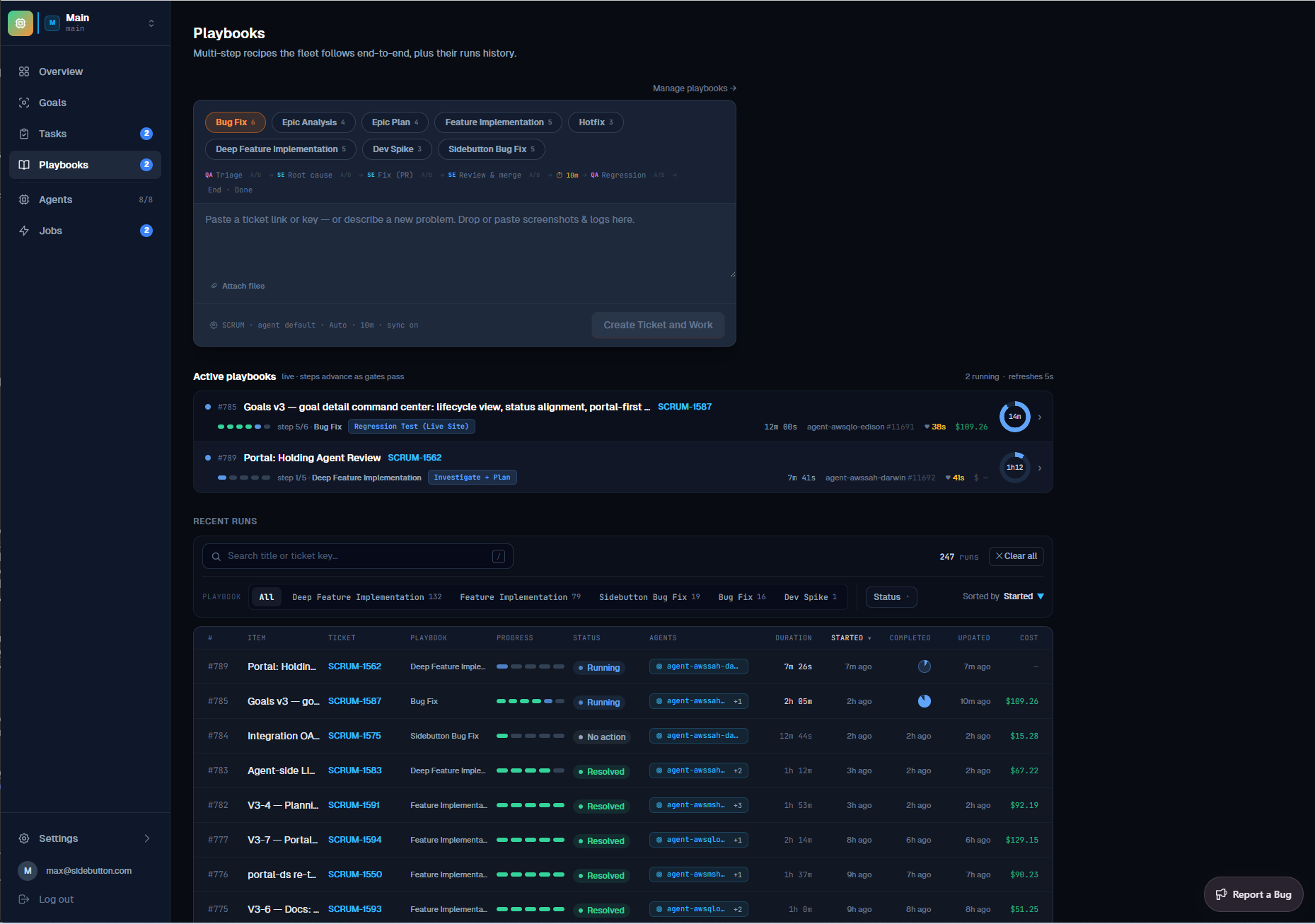
For batch work there is also the Tasks pool: queue many tickets with a playbook each, and the scheduler starts each one as agents free up — honoring "blocked by" links between pooled tickets, so dependent work runs in the right order.
Where workflows come from
Agent workflows are distributed as knowledge packs — the same mechanism that gives agents domain knowledge. The default agents pack (17 ops workflows plus role playbooks for SE, QA, PM and Skill Discovery) is installed when an agent is provisioned, and account-published pack updates propagate to running agents automatically. Publish a new workflow to your account registry and it becomes dispatchable across the fleet — no portal release involved.
# on any machine running SideButton
sidebutton install agents      # install the default agent-ops pack
sidebutton registry update     # refresh installed packs from your registries
Related Documentation
- Working with Playbooks — the Playbooks page end-to-end: intake, live zone, history and library
- Working with Tasks — batch many tickets into the pool and run them in dependency order
- Workflows Overview — the YAML DSL shared by both workflow flavors
- Knowledge Packs — authoring, installing and publishing packs
- Linear Automations — trigger playbooks from issue events
- Cloud Agents: AWS · Hetzner · GCP
- Connect your agents to your Claude subscription