SideButton MCP Server
Open source platform for AI agents with structured roles, skills, and domain knowledge.
What is SideButton?
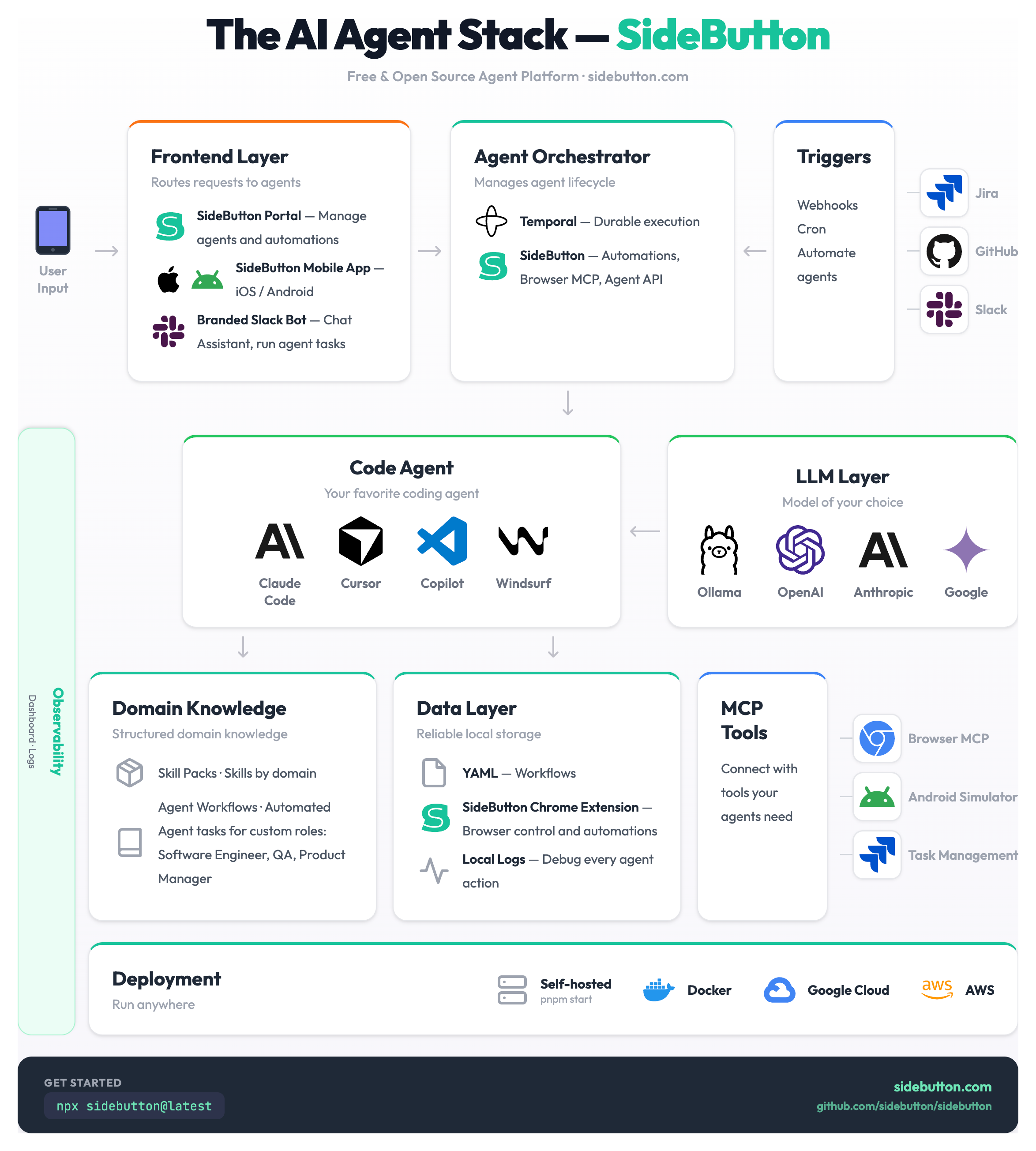
SideButton is an open-source platform that packages domain knowledge for AI agents. Install knowledge packs for web apps, automate with YAML workflows, and give AI agents real browser control via MCP.
- Install knowledge packs — pre-built bundles of domain knowledge, workflows, and role playbooks for specific web apps
- Define reusable workflows in YAML with 45 step types (browser, shell, LLM, issues, git, control flow)
- Connect AI agents via MCP — Claude Code, Cursor, or any MCP client gets real browser control
- Extend with plugins — add custom MCP tools in any language (bash, Node.js, Python)
How It Works
Install a knowledge pack  →  AI agent gets domain knowledge  →  Agent works autonomously
(CLI or registry) (selectors, roles, workflows) (browser + workflows)- Install a knowledge pack —
sidebutton install acme.example.comadds domain knowledge for that app - Connect your AI agent — Via MCP, your agent sees available workflows and context
- Agent works autonomously — Everything runs locally, your data stays private
Use Cases
| Use Case | What It Does |
|---|---|
| Install a knowledge pack | Add domain knowledge for any web app with one command |
| Agent explores an app | AI agent navigates, documents, and builds knowledge packs automatically |
| Publish a knowledge pack | Share your domain knowledge — free publishing, like npm for AI |
| Code Review | Let Claude review your PRs via MCP |
| Data Extraction | Pull data from web pages into structured format |
Next Steps
- Installation — Get SideButton running
- Knowledge Packs — Domain knowledge for AI agents
- MCP Setup — Connect Claude Code or Cursor
- First Workflow — Run your first automation
- Community Roles — AI agent role templates